

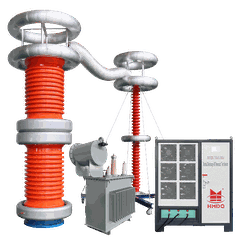

Hey there! As a supplier of AC Resonant Test System With PD, I've seen my fair share of issues, and one of the most common headaches is the no-signal problem. In this blog, I'm gonna walk you through how to troubleshoot this pesky issue step by step.
Understanding the AC Resonant Test System With PD
Before we jump into troubleshooting, let's quickly go over what an AC Resonant Test System With PD is. This system is used for high-voltage testing of electrical equipment, like HV Cable AC Resonant Tester. It works by creating a resonant circuit, which allows for efficient testing at high voltages. The Partial Discharge (PD) part of the system helps detect any insulation defects in the equipment being tested.
Possible Causes of the No-Signal Problem
There are several things that could cause a no-signal issue in an AC Resonant Test System With PD. Here are some of the most common culprits:
1. Power Supply Issues
- Faulty Power Cord: A frayed or damaged power cord can prevent the system from getting the power it needs. Check the cord for any visible signs of damage, like cuts or exposed wires.
- Power Outlet Problems: Sometimes, the issue might be with the power outlet itself. Try plugging the system into a different outlet to see if that solves the problem.
- Power Switch: Make sure the power switch on the system is turned on. It sounds obvious, but you'd be surprised how often this is overlooked.
2. Connection Problems
- Loose Cables: All the cables in the system need to be securely connected. Check all the connections, including those between the power supply, the test object, and the measuring instruments.
- Damaged Connectors: Over time, connectors can get damaged or corroded. Inspect the connectors for any signs of wear and tear, and replace them if necessary.
- Incorrect Cable Routing: Make sure the cables are routed properly and not tangled or pinched. This can cause signal interference and lead to a no-signal problem.
3. Sensor Issues
- Faulty Sensors: The sensors in the system are responsible for detecting the PD signals. If a sensor is faulty, it won't be able to send the signals to the measuring instruments. Check the sensors for any visible signs of damage, and test them using a sensor tester if available.
- Incorrect Sensor Placement: The sensors need to be placed in the right location to detect the PD signals accurately. Make sure the sensors are placed according to the manufacturer's instructions.
4. Software and Configuration Problems
- Outdated Software: Using outdated software can cause compatibility issues and lead to a no-signal problem. Check if there are any software updates available for the system, and install them if necessary.
- Incorrect Configuration Settings: Make sure the system is configured correctly for the test you're performing. Check the settings for things like frequency, voltage, and PD threshold.
Troubleshooting Steps
Now that we've identified some of the possible causes, let's go through the troubleshooting steps:
Step 1: Check the Power Supply
- First, visually inspect the power cord for any damage. If you find any, replace the cord.
- Plug the system into a different power outlet to rule out any outlet issues.
- Make sure the power switch on the system is turned on.
Step 2: Check the Connections
- Check all the cables in the system and make sure they are securely connected. Tighten any loose connections.
- Inspect the connectors for any damage or corrosion. If you find any, replace the connectors.
- Check the cable routing and make sure the cables are not tangled or pinched.
Step 3: Check the Sensors
- Visually inspect the sensors for any damage. If you find any, replace the sensors.
- Make sure the sensors are placed in the correct location according to the manufacturer's instructions.
Step 4: Check the Software and Configuration
- Check if there are any software updates available for the system. If there are, install them.
- Review the configuration settings and make sure they are correct for the test you're performing.
Step 5: Test the System
After you've completed all the above steps, test the system to see if the no-signal problem has been resolved. If the problem persists, it might be a more complex issue that requires professional assistance.
Additional Tips
- Keep a record of all the troubleshooting steps you've taken and the results. This can be helpful if you need to contact the manufacturer or a technical support team.
- If you're not sure how to perform any of the troubleshooting steps, refer to the system's user manual or contact the manufacturer for guidance.
Related Components in the System
In an AC Resonant Test System With PD, there are some important components that can also affect the signal. For example, the Compensation Capacitor Of Resonant Test Set helps in achieving resonance in the system. If this capacitor is faulty or not properly connected, it can lead to signal issues. Also, the Inductive Resonant Test System is another key part of the setup. Any problems with its components can also contribute to the no-signal problem.
Conclusion
Troubleshooting the no-signal problem in an AC Resonant Test System With PD can be a bit of a challenge, but by following the steps outlined in this blog, you should be able to identify and fix most of the common issues. If you're still having trouble, don't hesitate to reach out to us. We're here to help you get your system up and running smoothly. Whether you're looking to purchase a new system or need support for an existing one, we're just a message away. Let's start a conversation about your testing needs and how we can assist you.


References
- Manufacturer's user manual for the AC Resonant Test System With PD
- Industry standards and guidelines for high-voltage testing equipment