




Products Description

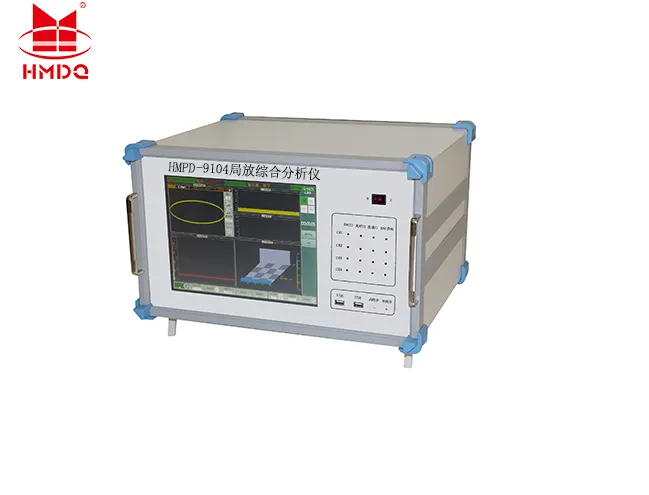
The HMPD-9104 Partial Discharge Tester is a specialized instrument designed to measure and analyze the insulation performance of electrical equipment. This system employs advanced electronic and computer integration technology to perform signal amplification (analog, electronic, and digital), filtering, data acquisition, data processing, graphical display, and automatic test report generation, thereby enabling the measurement of partial discharges and fault diagnosis.
Technical Parameters
Number of Channels: 4 independent channels
Sampling Rate :1 MHz, 5 MHz, 10 MHz (selectable)
Sampling Resolution :12-bit
Range Selection :-40 dB, -20 dB, 0 dB, 20 dB, 40 dB, 60 dB (6 ranges)
Measurement Bandwidth 3 dB bandwidth: 10 kHz to 1 MHz
Digital Filtering Frequencies from 10 kHz to 1 MHz (selectable)
Programmable Filter Bands Low-end frequencies: 10 kHz, 20 kHz, 40 kHz, 80 kHz
High-end frequencies: 100 kHz, 200 kHz, 300 kHz, 400 kHz
Non-linearity error within this range 10%
Measurement Range: 0.1 pC to 100,000 pC
Sensitivity :0.1 pC
Capacitance Range of Test Objects 6 pF to 250 µF
Test Power Supply Frequency Range 50 to 500 Hz
Display
Display 12" TFT True Color Touchscreen LCD
Resolution 1024 × 768
Interfaces
USB 3 ports, supports external mouse and keyboard, as well as external portable storage devices
Power Supply AC 220V; Frequency 50Hz; Power 300W
Electrical Signal Interfaces 4 BNC ports for signal input
Optical Signal Interfaces 4 ports for signal input
Ethernet Port 1 port
Ground Terminal External ground
General Specifications
CPU Clock Speed: 1.60 GHz
Memory 2.0 GB
Hard Drive 128 GB Solid-State Drive (SSD)
Operating System Windows XP
Operating Environment Ambient Temperature: -10°C to 45°C; Relative Humidity: ≤95%
Dimensions Length × Width × Height: 474 mm × 288 mm × 370 mm
Weight 15.8 kg
Main Interface

1 Run/Stop Indicator Indicates whether the device is running or stopped
2 Test Voltage Displays the test voltage; calibration is required for accurate measurement
3 Test Frequency Displays the current test frequency in real time
4 Trigger Mode Displays the current trigger mode for the test
5 Synchronization Mode Displays internal or external synchronization
6 Run Time Displays the test runtime; tapping "Run" starts the timer, and tapping "Stop" stops it
7 System Time Displays the system time
8 Single-Channel Control Buttons Gain
Adjusts channel gain
Compression
Compresses the amplitude of the discharge waveform
Stretch
Stretches the amplitude of the discharge waveform
Analysis
Performs windowed analysis on the discharge waveform
Adaptive
Performs adaptive amplitude adjustment on the discharge waveform
9 Channel Number Displays the channel number
10 Channel Discharge Amount Discharge level of the current channel
11 Band Selection Hardware band selection for the current channel
12 Calibration Indicator Displays "V" if calibrated
Displays "X" if not calibrated
13 Number of Windows Displays the number of windows for the current channel
14 Channel Interface Type Displays the interface type of the current channel
15 Channel Power Supply Indicator Displays the power supply status of the current channel
16 Control Buttons Partial Discharge Measurement Function Buttons
- Run/Stop
Device run/stop button
- Pause/Refresh
Pauses and refreshes waveform acquisition. Clicking "Pause" stops waveform acquisition, but the runtime in item 6 continues to accumulate. Clicking "Refresh" resumes waveform acquisition
- Test Folder
Test folder settings
- Measurement Mode
Switches between time-domain waveform mode and analysis/diagnosis mode
- Report Generation
Generate test report
- Screen Capture
Take a quick screenshot
- Manual Save
Manually save partial discharge test records
- Record Browsing
Browse partial discharge test records while playing back historical partial discharge waveforms
Exit System
Exit the partial discharge comprehensive analyzer software
17 Amplitude Slider Used to compress or stretch the amplitude of discharge waveforms
Hot Tags: high voltage online partial discharge monitoring system, China high voltage online partial discharge monitoring system manufacturers, factory


