

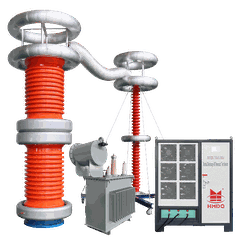



Yo, folks! As a supplier of Portable Hipot Testers, I often get asked this question: Can a Portable Hipot Tester be connected to a computer for data transfer? Well, let's dive right into it and find out.
First off, what's a Portable Hipot Tester? It's a handy device used to perform high - potential (hipot) tests on electrical equipment. These tests are crucial for ensuring the safety and reliability of electrical components. You can check out some of the cool Breakdown Voltage Test Equipment we offer, which are pretty much top - notch in the market.
Now, back to the main question. The short answer is yes, in most cases, a Portable Hipot Tester can be connected to a computer for data transfer. But there are a few things to consider.
How does the connection work?
There are mainly two common ways to connect a Portable Hipot Tester to a computer: via USB and via Bluetooth.
USB Connection
USB is a super popular and straightforward way to transfer data. Most modern Portable Hipot Testers come with a USB port. You just need to plug one end of the USB cable into the tester and the other end into your computer's USB port. Once connected, your computer should recognize the tester as an external device.
Some testers might require you to install special software provided by the manufacturer. This software helps in communicating with the tester, retrieving the test data, and presenting it in a user - friendly format. It's like having a translator between your tester and your computer.
Bluetooth Connection
Bluetooth is another convenient option, especially if you don't want to deal with cables. If your Portable Hipot Tester has Bluetooth capabilities, you can pair it with your computer. On your computer, you'll need to turn on the Bluetooth function and search for nearby devices. Once you find the tester in the list of available devices, you can pair them.
The advantage of Bluetooth is that you can move the tester around within a certain range without being restricted by a cable. It's great for on - site testing where you might need to move the tester to different locations.
Why is data transfer important?
Data transfer from a Portable Hipot Tester to a computer offers several benefits.
Record - keeping
When you perform hipot tests, it's essential to keep accurate records of the test results. By transferring the data to a computer, you can store it in a digital format. This makes it easier to organize, search, and retrieve the data whenever you need it. You can create folders for different projects or time periods, and label the files appropriately.
For example, if you're testing a batch of electrical products, you can save the test results for each product separately. Later, if there are any issues or if you need to provide proof of compliance, you can quickly access the relevant data.
Analysis
Once the data is on your computer, you can use various software tools to analyze it. You can create graphs, charts, and reports to visualize the test results. This can help you identify trends, such as whether the insulation resistance of a particular type of equipment is gradually decreasing over time.
Let's say you're testing a series of transformers. By analyzing the data, you might notice that one transformer has a consistently lower breakdown voltage compared to the others. This could indicate a potential problem with that transformer, and you can take appropriate action.
Sharing
If you're working in a team or need to share the test results with your clients, transferring the data to a computer makes it easy. You can email the data files, upload them to a cloud storage service, or print out reports. This promotes better communication and collaboration.


Compatibility Issues
While it's generally possible to connect a Portable Hipot Tester to a computer, there can be some compatibility issues.
Software Compatibility
As mentioned earlier, some testers require specific software to communicate with the computer. This software might only be compatible with certain operating systems, such as Windows, macOS, or Linux. Before you buy a tester, make sure to check the software requirements and ensure that your computer's operating system is supported.
Hardware Compatibility
Sometimes, there might be issues with the hardware itself. For example, if your computer's USB port is damaged or if the Bluetooth module on your computer is not working properly, you might face problems connecting the tester. You should also check the power requirements of the tester. Some testers might draw more power through the USB connection than your computer can provide, which could lead to unstable connections.
Our Product Examples
We offer a wide range of Portable Hipot Testers, including the 300kV/5mA DC Hipot Tester. This tester is not only powerful but also easy to connect to a computer for data transfer. It comes with both USB and Bluetooth options, giving you the flexibility to choose the connection method that suits you best.
Another great product is our AC Test Transformer - Dry Type. It's designed for accurate AC hipot testing, and it can also be connected to a computer to transfer the test data.
Final Thoughts
Connecting a Portable Hipot Tester to a computer for data transfer is a great way to enhance the functionality and usability of the tester. It simplifies record - keeping, enables in - depth data analysis, and promotes better communication.
However, it's important to choose the right tester that meets your needs and to ensure compatibility with your computer. If you're not sure which Portable Hipot Tester is the best for you or if you have any questions about data transfer, don't hesitate to reach out to us. We're here to help you make the right choice and get the most out of your testing equipment.
Whether you're a small - scale electrical repair shop or a large - scale manufacturing company, having a reliable Portable Hipot Tester with data transfer capabilities can make your testing process more efficient and effective.
So, if you're in the market for a Portable Hipot Tester, consider the data transfer features and how they can benefit your business. And if you have any further questions or want to discuss your specific requirements, feel free to contact us. We'd love to have a chat and see how we can assist you in your procurement process.
References
- Manufacturer's manuals of Portable Hipot Testers
- Industry standards related to hipot testing and data management


