





Products video
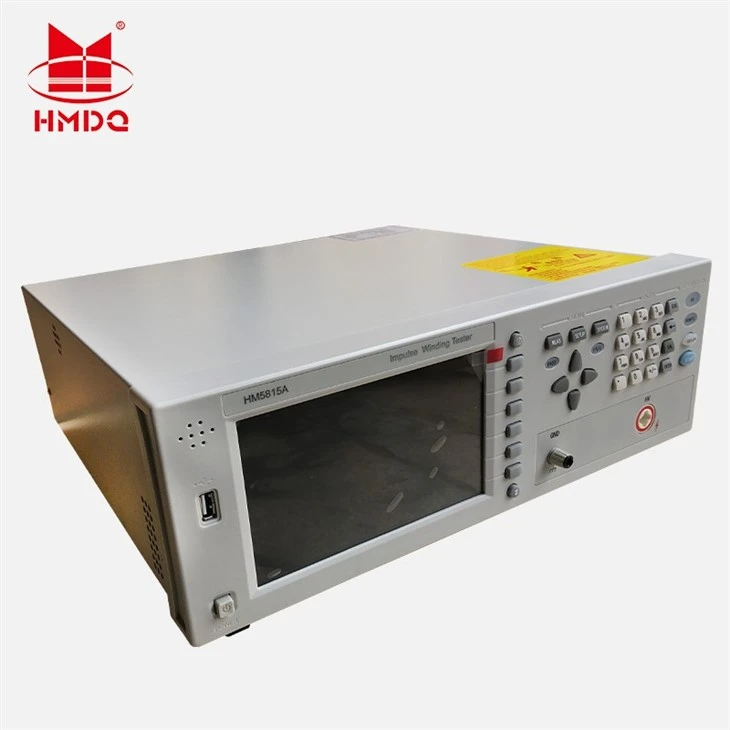
HM5815A Impulse Winding Tester Description Video
Product Overview

The HM5815 series compares standard waveforms stored in non-volatile memory with the current test waveform. It provides pass/fail comparison results based on area deviation, differential area, corona discharge, or phase deviation. With its powerful functionality, precise comparison methods, simple operation, and extensive interfaces, the HM5815A delivers a perfect testing solution for the vast majority of winding products.
Principle Description
Principles of impulse winding test
The impulse winding tester tests the electrical characteristics of coil winding without damaging the DUT. The prerequisite condition is to test the quality of a coil at just a glance. The detection is carried out when the same electric impulse, as used in the standard coil and here discharged by a capacitor, is applied to the DUT. The voltage attenuation wave is generated in response to the impulse, related to the Q-factor and inductance of the coil. In this sense, the tester can detect turn and layer short, the differences in the number of turns and the material of the core. If high impulse voltage is applied, the poor insulation will appear as a corona or layer discharge.

Figure 1-1 Simplified diagram for principles of impulse winding test
In figure 1-2, the self-oscillation attenuation wave has a close relation with the inductance L and quality factor Q, while L and Q depend on the number of turn, manufacture technology, properties of iron core material and whether it has air-coils. What's more, the applied voltage is a high impulse voltage, thus, it is easy to observe the short circuit, partial short turns and lays or turns discharge phenomenon caused by insulation damage.

Figure 1-2 Typical self-attenuation oscillation wave
Products parameter
|
Specifications |
HM5815-5 |
|
|
Output for impulse voltage |
100V~5000V 10V steps 5%±15V |
|
|
Inductance test range |
>10μH |
|
|
Impulse energy |
Max 250milli-Joules |
|
|
Contents in waveform display area on LCD |
800×480 dot-matrix LCD 255×650 dot-matrix Setup parameters, standard wave and test wave, comparison result, file information, etc. |
|
|
Sample wave |
Sampling rate: 200MSPS(only A series) 100MSPS, 50MSPS, 20MSPS, 10MSPS, 5MSPS, 2MSPS, 1MSPS, 500kMSPS, 200kMSPS,100kMSPS Resolution: 8bits Sampling point: 6500bytes |
|
|
Standard wave sample |
Sequential cycle, single cycle, one sample (up to 32 times of sample averaging) |
|
|
Input impedance |
5MΩ |
|
|
Test speed |
6 times/sec |
|
|
Averaging rate |
Number of test impulse |
|
|
Number of demagnetizing impulse |
||
|
Measurement function |
Voltage, time and frequency |
|
|
Trigger mode |
Internal, Manual (Foot), External and Bus |
|
|
Comparison method |
AreaSize Comparison DiffZone Comparison Corona Comparison PhaseDiff Comparison |
|
|
Area size measurement accuracy |
±1% |
|
|
Area difference measurement accuracy |
±1% |
|
|
Comparison output |
PASS/FAIL display Beeper alarm |
|
|
Beep mode |
ON (adjust for high and low tone), OFF |
|
|
Memory |
Built-in memory: 100 files USB disk memory |
|
|
Interface |
HANDLER (START, STOP, PASS, NG, BUSY, EOC, etc.) RS232C USB Device USB Host LAN |
|
Products Description
Panels and display:

|
Serial Number |
Name |
Instruction |
|
1 |
Buzzer window |
|
|
2 |
USB HOST interface |
Connect U flash disk so as to save or use a specified file |
|
3 |
Brand and model |
|
|
4 |
LCD |
840×480 Large-Scale dot-matrix LCD displays measurement waveform, set parameters, system configurations, etc. |
|
5 |
FILE |
Press this key to enter into the file setup page |
|
6 |
SOFTKEY |
Six soft keys are used to select parameters. The corresponding function of each soft key has been displayed on its left (the right part of LCD). The function definition varies with different pages |
|
7 |
[DISP] |
Press this key to enter into the display page of transformer scanning test. |
|
8 |
[SETUP] |
Press this key to enter into the setup page of transformer scanning test. |
|
9 |
CURSOR |
Cursor key is used to select cursor between zone and zone on LCD display page. When cursor moves to some zone, the zone displays with reverse on LCD. |
|
10 |
[SYSTEM] |
Press this key to enter into the system setup page. |
|
11 |
Numerical keys |
These keys are used to input data to the instrument. The key consists of numerical keys [0] to [9], decimal point [.] and [+/-] key |
|
12 |
ESC |
ESC key is used to cancel the enter of numbers or characters. |
|
13 |
BACKSPACE |
The function of BACKSPACE key is to delete numbers or characters wrongly entered. |
|
14 |
[CAL] |
Execute the calibration operation. Press this key to execute OPEN/SHORT calibration. |
|
15 |
ENTER |
ENTER key terminates numeric input data and enters the displayed value on the data input line (bottom line of the LCD screen). |
|
16 |
HV |
High Voltage Indicator indicates that the instrument is outputting dangerous impulse test voltage to the HV terminal on the rear panel. Do not touch test terminals or DUT. |
|
17 |
Remote |
remote control |
|
18 |
[KEYLOCK] |
Press [KEYLOCK], it will be lighted, which means the function of current panel is locked. Press it again, it will be off, which means discharging the lock status. If the password function is ON, it means correct password is necessary when discharging the key-lock, or the key cannot be unlocked. |
|
19 |
START |
Press the START key to start a measurement. In the process of test, pressing the key will terminate the measurement. |
|
20 |
High voltage terminal |
Output high voltage. |
|
21 |
Ground terminal |
Low terminal for high voltage test, connecting to a test fixture and DUT with 15. |
|
22 |
COPY |
Capture the screen information |
|
23 |
POWER |
Switch on or off the main power |
Table 1 Front panel instruction
Product Details


Hot Tags: Impulse Winding Testing Device, China Impulse Winding Testing Device manufacturers, factory
Technical Specifications
|
Specifications |
HM5815-5 |
HM5815-10 |
|
Output for impulse voltage |
100V~5000V 10V steps 5%±15V |
500V~10000V 200V steps 5%±25V |
|
Inductance test range |
>10μH |
>20μH |
|
Impulse energy |
Max 250milli-Joules |
Max 500 milli-Joules |
|
Contents in waveform display area on LCD |
800×480 dot-matrix LCD 255×650 dot-matrix Setup parameters, standard wave and test wave, comparison result, file information, etc. |
|
|
Sample wave |
Sampling rate: 200MSPS(only A series) 100MSPS, 50MSPS, 20MSPS, 10MSPS, 5MSPS, 2MSPS, 1MSPS, 500kMSPS, 200kMSPS,100kMSPS Resolution: 8bits Sampling point: 6500bytes |
|
|
Standard wave sample |
Sequential cycle, single cycle, one sample (up to 32 times of sample averaging) |
|
|
Input impedance |
5MΩ |
|
|
Test speed |
6 times/sec |
|
|
Averaging rate |
Number of test impulse |
1 to 32 averaging rate programmable |
|
Number of demagnetizing impulse |
0 to 16 averaging rate programmable |
|
|
Measurement function |
Voltage, time and frequency |
|
|
Trigger mode |
Internal, Manual (Foot), External and Bus |
|
|
Comparison method |
AreaSize Comparison DiffZone Comparison Corona Comparison PhaseDiff Comparison |
|
|
Area size measurement accuracy |
±1% |
|
|
Area difference measurement accuracy |
±1% |
|
|
Comparison output |
PASS/FAIL display Beeper alarm |
|
|
Beep mode |
ON (adjust for high and low tone), OFF |
|
|
Memory |
Built-in memory: 100 files USB disk memory |
|
|
Interface |
HANDLER (START, STOP, PASS, NG, BUSY, EOC, etc.) RS232C USB Device USB Host LAN |
|